Sometimes when you run a query you may want to rename the columns in the results. This is quite a simple process within SQL.
First you will need to know the source column names.
For example
USE AdventureWorks
SELECT * FROM [HumanResources].[Department]


Or you can open up the table which gives the column names.
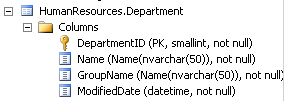
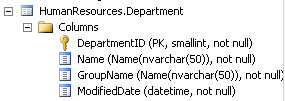
You can change the name of the column by using the below SYNTAX
[ SourceColumn Name] AS [DesiredOutputName]
SELECT [DepartmentID] AS ID,
[Name] AS [Department Name],
[GroupName] AS [Function],
[ModifiedDate] AS LastChangeDate
FROM [HumanResources].[Department]


Originally published at https://parvtheitgeek.com on January 5, 2014.
 Parv The IT Geek